[v21] new rs.local/ not loading properly

Hi Ivor,

I can confirm that our 8 stations have the same behavior than raychu.
And restart the service didn’t succeed resolve this bug.
Possibly, in a local network, if I still on the web page then restart the shake, the interface could stay functional.
I can wait to use it, cause it seem a great improvement of the interface :).

Bye

1 Like

Hey guys,
hope you’re fine

So, any update on a quick fix about the web page interface ?
Cause as everybody says, restart the rsh-fe-config does not work.

You know, that’s kind of critical, because all our observation station are actually difficult to read because of our monitoring system.
But, another point, and not the least, we just learn that you have a direct root access on our unit.
We are public research, but not everyone is. You should be careful about it.
So I think, reasonably, that you have to take this very seriously and, at least, announce a date for a fix. 9 days ago you talk about “a patch release to be issued within a week’s time”, then nothing.

So, where are we now?
Thanks for your work,
bye.

hi benjamin.vial,

i have replied to raychu’s post regarding the problem of the FE app “going down”, it can be found here.

can you also please confirm any firewall / router settings which may be coming into play?

cheers,
richard

1 Like

To my knowledge, this is not mentioned; and I don’t know if it’s a problem, to be honest.
The fact is that there has recently been a massive update to Raspberry Shake & Jam (particularly concerning their web page graphical interface), which requires modifications with root access. These modifications were initiated by the Shake developers. However, our stations (in my lab) have individual root passwords, which only we could know. I deduced that there is another access account reserved for developers, but perhaps I am mistaken.
Our stations are on LTE routers, on the field, in different parts of the French Alps.
Again, we are public research, so that’s not a problem, but things could be seen differently by private users, in their home, on their local network.

hi benjamin.vial,

apologies for the delayed patch release. it was anticipated that there would be a quicker turn-around to get this out. however, other small issues were discovered needing to be handled, and i will always favor delaying a non-critical patch release instead of putting out multiple releases in quick succession. that said, it is on me that the messaging to the community was not updated, that the patch release would be a bit further delayed, my apologies; this will be corrected for future updates.

regarding root access to the unit: all Raspberry Shake seismometers are essentially an appliance, where we will make updates from time to time to the system as deemed necessary and interesting, where these updates constitute both bug-fixes and enhancements. indeed, this is covered in the Shake user license:

We reserve the right to make any changes to the Raspberry Shake Operating System and there is no guarantee that your follow-on systems will not break.

what i can say is that when any updates are applied to the system, only the Shake-OS elements themselves are touched. any custom modifications made by the user, (which is discouraged), are not directly modified. and while true, this does not mean that an update to the system won’t break any customizations we don’t know about.

and to be clear: root access is not achieved from the outside using ssh or any other login method. rather, updates made to the unit happen via the Shake-OS updater, where this involves downloading the update, followed by its installation. this is exactly the same method used to update your telephone, television, or any other IoT appliance connected to the internet. as is advertised, root login is disabled for everyone, no one can log in to the Shake via the root user, including us.

as for the patch release status, we will be creating a new announcement thread to address this directly.

i hope this clarifies the situation for you and anyone else who may be following along.

warm regards,
richard

fyi: @K2PI
2 Likes

OK, I understand better now, and I should have guessed that there was more security than my knowledge led me to believe; besides, I wasn’t really worried, as the Raspberry Shake company already seemed serious enough to me. I hope I haven’t caused concern among other users!

As for opening ports 8765 & 8766, it didn’t change the behavior of the model I’m testing. In fact, I even removed all connection restrictions, but I still have a waiting screen on the home page, even after restart the service. I even try to connect a ssh tunnel from the local router, to imitate a local connection, but the waiting screen still there.

With a netstat on the shake, I can indeed see something :

tcp6       0      0 [::]:8765               [::]:*                  LISTEN     
tcp6       0      0 [::]:8766               [::]:*                  LISTEN

But I can’t see any com with this port on the router.
I continue to investigate…

hi,

thanks for the quick feedback!

as another check, in the browser tab in question, can you:

  • F12 to open the web developer tools
  • refresh the page with CTRL-R
  • look at both the Console and Network tabs
  • report back anything of interest, either text-copy or screenshots, whichever you think works best

thanks in advance,
richard

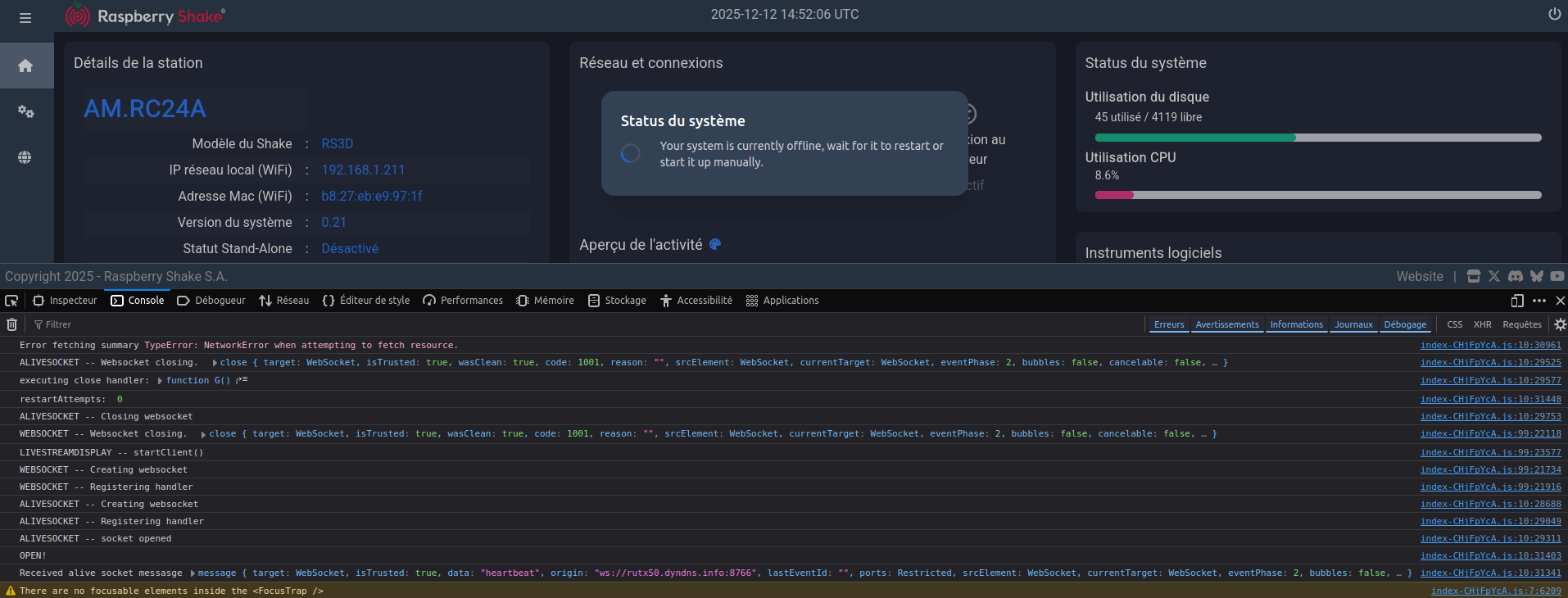
Well, with the inspector I saw an error about ports 8765 & 8766 request, ans so I add a port forward to alloy every request on port 8765 and 8766 straight to the shake. Then the error seen in inspector disappear, but the message still.

Here a screen of the console :


I’m not skill enough to interpret this, maybe you can.
If I’m stay on the page, this console messages repeat each 10 sec approx.

Note : adding the last port forward result in the fail of focusing the error message “Your system is currently offline, …”, as you can see in the last log. Don’t know if it’s important, but just in case.

thanks! this is very helpful and we continue our investigations.
richard

Hey guys, hope everythings is all right on your side.
I come for some news, have you succeeded find the problem that occur on Rshake webpage ?

I checked and all my shake / jam are in 21.1 but, same as before, the webpage still in “the rshake starting”. Is this the same for anyone else ?

Bye

Hello benjamin,

Thank you for writing to us about this. We have not received other reports about this after the v0.21.1 update, so let’s try to understand what is still going on.

Could you try opening rs.local/ from a private window, or from a different browser, just to be sure?

Also, could you SSH into the Shake (or the Shakes), retrieve and zip/tar all the content in the /opt/log folder and send the zipped file to us?

We need information from the inside to see why the dashboard is still displaying that.

Also, if it is possible, could you:

  • shut down the Shake
  • disconnect it from the power supply
  • wait for 5 minutes
  • reconnect the power supply, turn it back on
  • wait for an hour, then download a new set of logs and send those too?

Having data from both before/after could be useful.

Thank you very much for your collaboration.

Hello,

ok I get the log before, and after restart ; I have made a fresh install on the shake from the release available on github, in order to get a good start, then the shake automatically upgrade to 21.1.
From there, I can connect to the web page, but same as before, the message still.

I made a new test too, I have use a Rpi 4 with the same board. On this one, the webpage correctly display, but the station code is different and, even if I authorize it, the shake seem never connect to the network (dataview / stationview).
I made the same test on a rpi5 board, but on this one, it never boot up (service seem never load, no device start, even the RJ45 still totally quiet). But as the 5 is very different from its predecessor, I’ve not made more investigation.

Where can I send the log archives ?

bye

Hello benjamin. I’ve moved all your post chronology to a dedicated topic, because it was becoming a bit confusing in the other one. We can focus more here.

Regarding the logs, you can either upload them here, or if you prefer them to be private, send a private message to my account (just click on my avatar icon and then select “Message”).

Thank you for the further troubleshooting. The RPi 5 board failed to start because we do not support it, so the software doesn’t know what to do with that hardware infrastructure.

The RPi 4 board, instead, seems quite promising as it displayed the new rs.local/ without issues, and the only problem seems to be related to server connection. The name change is expected, and you can find more on that here.

In any case, post the logs at your convenience and we’ll proceed from there.

Hi,

here is a download link for the log : https://filesender.renater.fr/?s=download&token=e2ae50ed-9c73-42e0-b508-6521547d464b.

Let me know if you need something else.

bye

1 Like

Perfect, thank you Benjamin. I was able to retrieve the two sets.

Both of them, however, indicate that the Pi board could not see any Shake board installed on it

2026 041 13:54:17: Unable to read Firmware version number off of Serial Port /dev/serial0 after trying for 15 seconds, cannot continue!
2026 041 13:54:17: Is the Pi computer connected to the Raspberry Shake Board?  Please confirm and try again.

The first (before) log set was incomplete, so having the second (after) was very helpful. Could you please check that the Shake board you tested was solidly installed on the Pi board underneath it?

A second question:
Do the other Shakes you originally listed (I think you said there were 8 of them) have a working updated dashboard now, with v0.21.1?

If not, could you retrieve the logs from them (at least one, but more would be better) and send them to us?

Thank you.

Hello,

I confirm that these boards are correctly assembled, with screw and spacers, and the LED correctly light in blue. But I’ll double-check, just in case.

And about our boards, actually those on the field (3 jam and 5 shake) seems ok, no more wait screen, apart for one rshake 3D (AM.R8A70).
But for those inside my workshop, something is wrong (mostly) . I could be logical to think about the router I’m using, but a lot of stuff working on it without any trouble (and it doesn’t sound like a network problem). To be honest I can’t remember which shake board were bought first (if it could be a hardware version problem).

As I have something about 5-7 shake my workshop, I will not be able to get logs on every one of them, I can’t spend too much time on it.
I’ll try different combination of shake board / Rpi board. And I have notice that sometimes on a Rpi3 board which is in default, switching on a Rpi 4 will pass the rshake all on green, including server connection, so it could be a “trick”.
In few days I’ll receive three or four units of Rpi 4 board, I’ll let you know what the result of different “swap”.

Last question, I had proceeded 2 different way to burn a SD card with the rshake OS on github.

  • long ago, I cloned the git, then unzip, then use “Rpi imager” or “balena etcher” to burn only the “rshake_os.xz” file on the SD card. It’s worked fine.
  • But since few month, I saw on the notepad in the git archive, that we have to unzip all the content of “raspishake-release_V0.19” into the SD card, which we format in FAT32. Then during the boot the OS is installed.

What way is better, in your opinion ?

Bye

Thank you for the detailed update benjamin.

It’s good to know that the remote Shakes have successfully updated and are now working fine. If you ever manage to acquire the logs for the remaining 3D, I can take a look at them.

Yes, that behavior after swapping is interesting. It could be useful (repeating myself, I know) to have logs from before (with a Rpi3) and after (with a Rpi4) to see what happens in more detail. Thank you for this.

Regarding your last question, the two methods lead to the exact same result. So you can either use BalenaEtcher to burn the rshake_os.xz file, or unzip all the content in the microSD.

Personally, I use the copy/paste, which is more straightforward and doesn’t need you to use another software. But in the end, the outcome will be the same with either method.

The essential part in the whole process is formatting the microSD card to be sure that 1) it’s in FAT32 format, and 2) the whole capacity is available, instead of a smaller partition.

Only here to confirm that v0.21.1 works great on all of our devices in the school array.

Only one device is still stuck to the v0.20 software. It refuses to update automatically for some reason and is experiencing a lot of dropouts. Could you check the log files if you notice something suspicious before we go to the location, which is quite far away, to flash the SD card.

Thanks a lot.

Gregor

RSH.R9164.2026-02-19T10_48_47.logs.tar (4.4 MB)

1 Like