RSUDP - No data received

Hello,

I followed the manual to run my Raspberry Shake: I connected the Shake to my home Wi-Fi network, accessed the interface and filled out all the required information and turned “Forward data” on.
I also added a datacast address because I want to use rsudp.

The datacast IP address is of my Ubunto VM (running on MacBook) after configuring the VM network as “bridged adapter” to get an IP address on the same subnet as the Shake. The port number is 8888.
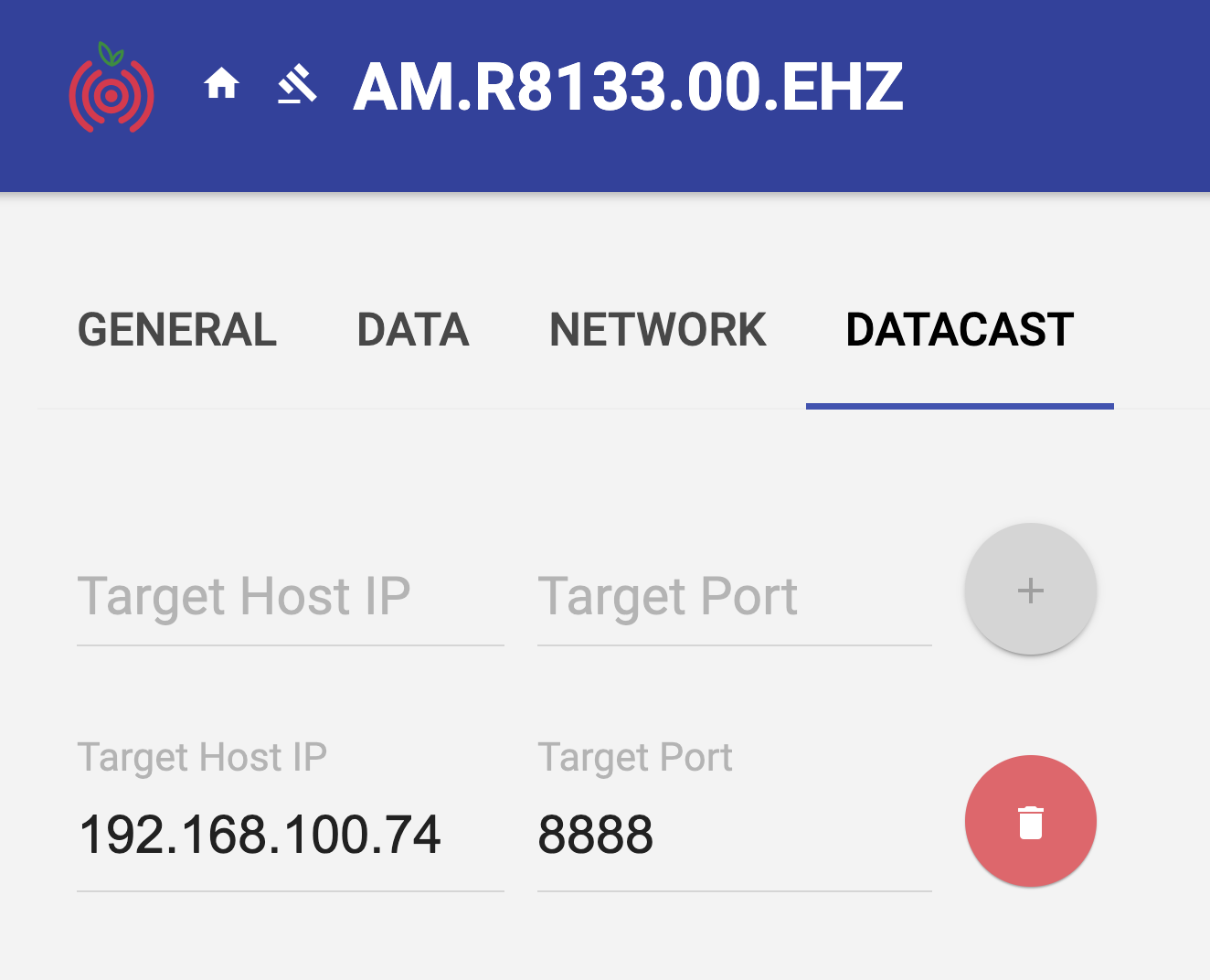
I followed the manual to install rsudp and configured the settings file with my station name and port number. You can find the settings file attached.

The issue is when I run rs-client command in rsudp environment I get the following error:

(rsudp) vboxuser@Ubuntu-24:~$ rs-client
/home/vboxuser/miniconda3/envs/rsudp/lib/python3.12/site-packages/pydub/utils.py:170: RuntimeWarning: Couldn't find ffmpeg or avconv - defaulting to ffmpeg, but may not work
  warn("Couldn't find ffmpeg or avconv - defaulting to ffmpeg, but may not work", RuntimeWarning)
/home/vboxuser/miniconda3/envs/rsudp/lib/python3.12/site-packages/pydub/utils.py:184: RuntimeWarning: Couldn't find ffplay or avplay - defaulting to ffplay, but may not work
  warn("Couldn't find ffplay or avplay - defaulting to ffplay, but may not work", RuntimeWarning)
2025-11-06 17:11:25 [Init] Logging initialized successfully.
2025-11-06 17:11:25 Using settings file: /home/vboxuser/.config/rsudp/rsudp_settings.json
2025-11-06 17:11:25 Output directory is: /home/vboxuser/output_dir
By default output_dir is set to /home/vboxuser/rsudp
2025-11-06 17:11:25 [RS lib] Initializing rsudp v 2.2.1.
2025-11-06 17:11:25 [openSOCK] Opening socket on localhost:8888 (HOST:PORT)
2025-11-06 17:11:25 [RS lib] Waiting for UDP data on port 8888...
2025-11-06 17:11:35 [Init] ERROR: No data received in 10 seconds; aborting.
2025-11-06 17:11:35 [Init]        Check that the Shake is forwarding data to:
2025-11-06 17:11:35 [Init]        IP address: 192.168.100.74    Port: 8888
2025-11-06 17:11:35 [Init]        and that no firewall exists between the Shake and this computer.
Traceback (most recent call last):
  File "/home/vboxuser/miniconda3/envs/rsudp/bin/rs-client", line 7, in <module>
    sys.exit(main())
             ^^^^^^
  File "/home/vboxuser/miniconda3/envs/rsudp/lib/python3.12/site-packages/rsudp/client.py", line 521, in main
    run(settings, debug=debug)
  File "/home/vboxuser/miniconda3/envs/rsudp/lib/python3.12/site-packages/rsudp/client.py", line 154, in run
    rs.initRSlib(dport=settings['settings']['port'],
  File "/home/vboxuser/miniconda3/envs/rsudp/lib/python3.12/site-packages/rsudp/raspberryshake.py", line 175, in initRSlib
    set_params(settings=settings)                # get data and set parameters
    ^^^^^^^^^^^^^^^^^^^^^^^^^^^^^
  File "/home/vboxuser/miniconda3/envs/rsudp/lib/python3.12/site-packages/rsudp/raspberryshake.py", line 226, in set_params
    data, (firstaddr, connport) = sock.recvfrom(2048)
                                  ^^^^^^^^^^^^^^^^^^^
  File "/home/vboxuser/miniconda3/envs/rsudp/lib/python3.12/site-packages/rsudp/raspberryshake.py", line 100, in handler
    raise IOError('No data received')
OSError: No data received
(rsudp) vboxuser@Ubuntu-24:~$ 

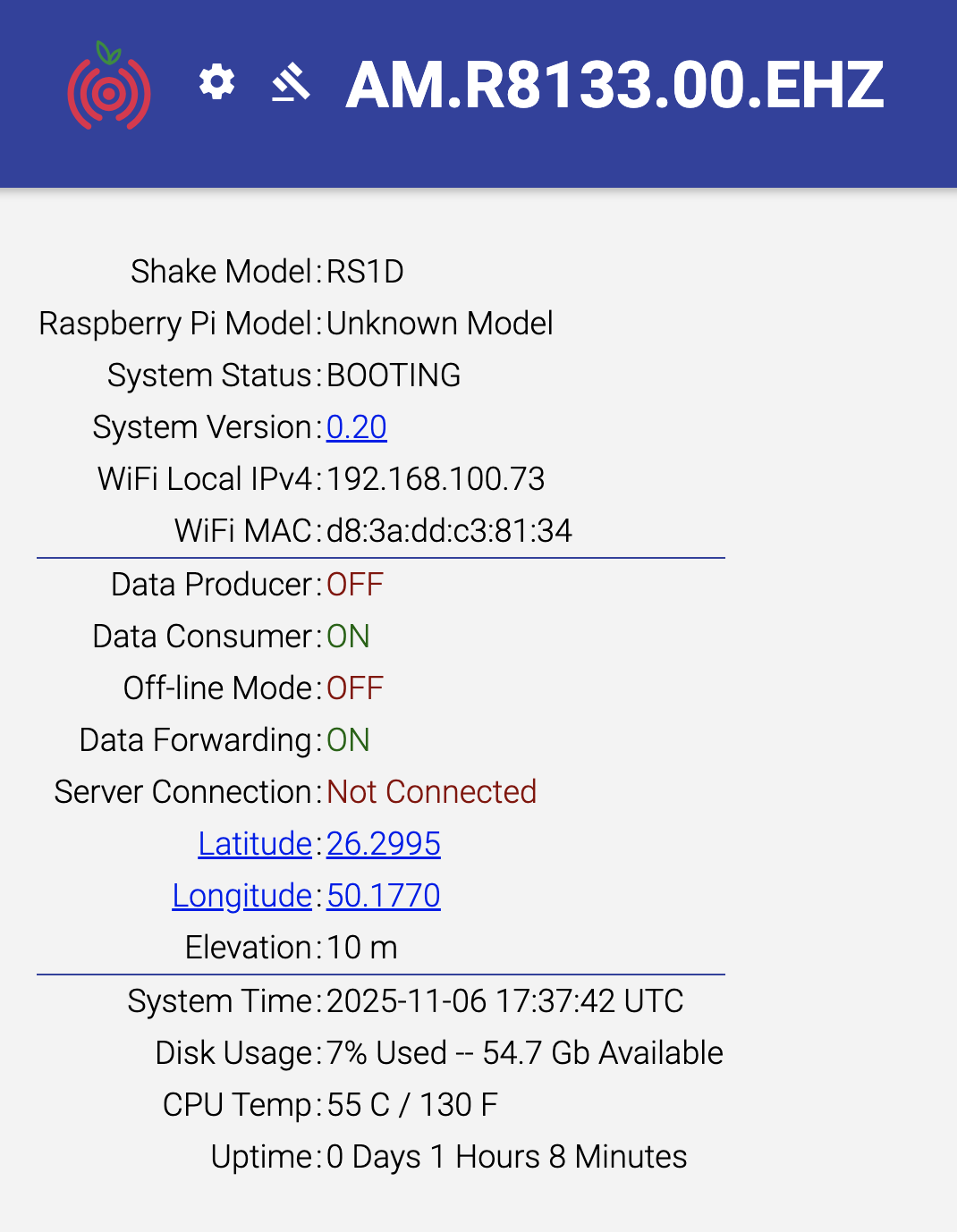
This is the status of my Shake:
I tried sending test data from my Shake to the VM on port 8888 to make sure it is not a network/firewall issue and the VM actually received the data with no issues. I tried rebooting many times but nothing worked.

I attached the log files.

I’d really appreciate your help!
Thanks.

rsudp_settings.json (2.0 KB)
RSH.R8133.2025-11-06T16_49_50.logs.tar (341 KB)
Hello linah,

Thank you for all the details and the logs from the Shake. From the last screenshot, it can be seen that the Shake is still in a BOOTING status, and that not all data services are ON.

It appears that, however, the logs are incomplete, so could I please ask you to:

  1. Shut down the Shake
  2. Disconnect the power supply cable, wait for 5 minutes
  3. Reconnect the power cable (as you are connected via WiFi) and turn on the Shake again
  4. Wait for about 30-60 minutes, download the logs from the Shake and attach them to your next answer?

Let’s see if this new set will provide more answers. Thank you.

Thank you for your reply!

I did what you asked. Please find attached the new log files after 1 hour of running.
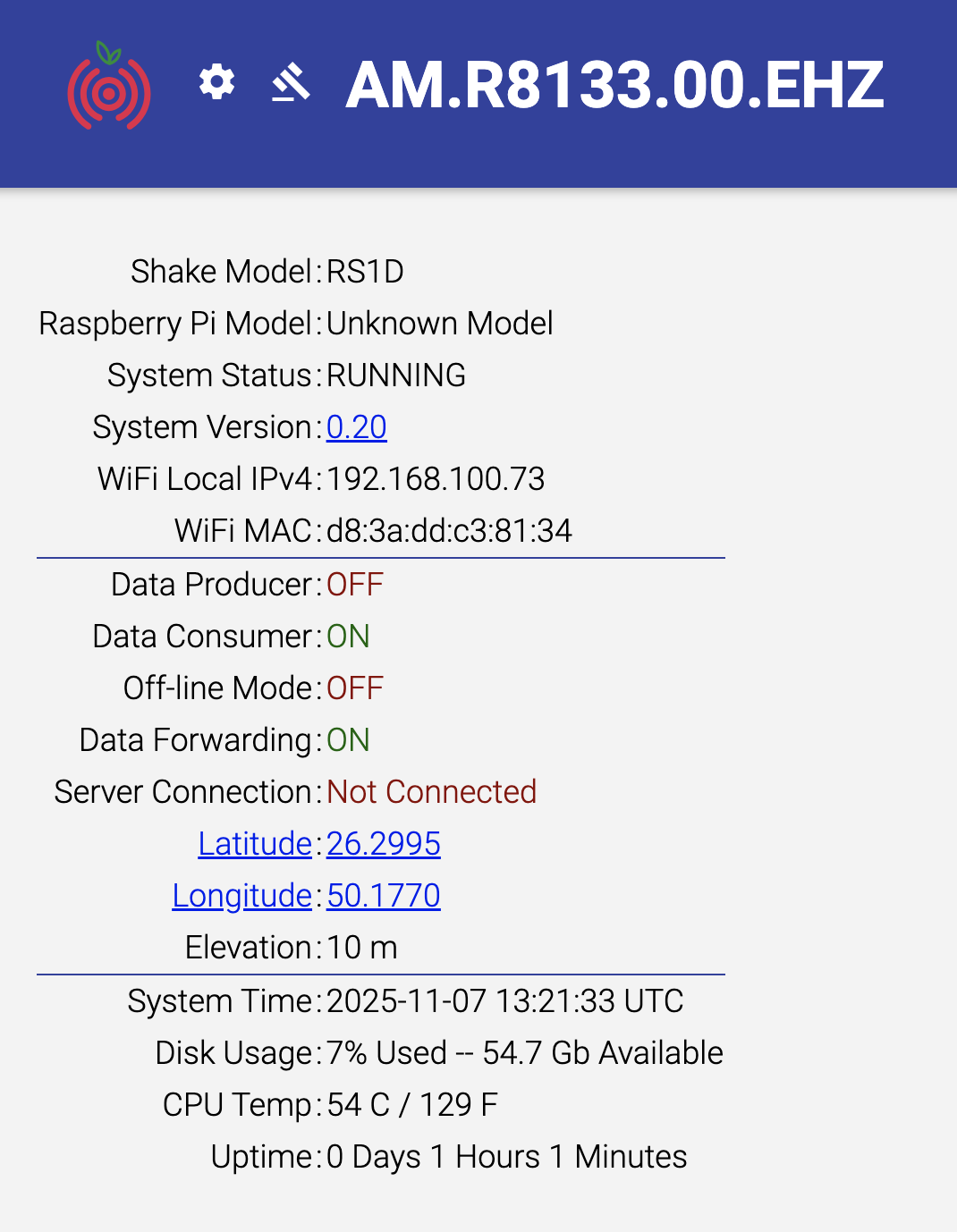
Also, this is the status now:

(I did not notice the BOOTING status before… not sure when exactly did it appear… but now it is RUNNING)

Thanks again!

RSH.R8133.2025-11-07T13_28_33.logs.tar (356 KB)

1 Like

No trouble, and thank you for the new screenshot and the logs.

This was a bit baffling, so I asked support of our software team, and they found the issue. As you can see, the Data Producer is still OFF even if the Shake has completed the booting procedure. This is usually caused by some software corruption on the microSD card and there are two solutions to fix it:

  1. The fastest would be simply re-burning the microSD card with a fresh Shake OS install. All instructions to do so can be found here.

  2. The second would require you using command prompts to SSH into the Shake and execute these two commands, one after the other, then rebooting:

  • docker rm -f dataP
  • docker ps -a

This should return a list of only two items. If it doesn’t, then a re-burn becomes mandatory.

Also, if after the reboot (you can do it by executing sudo reboot from the command line), the Data Producer is still OFF, a re-burn remains the only solution.

Let me know how it goes!

Hi! I have a very similar issue than the one shown above. The system says it’s RUNNING, everything is ON (except the off-line mode; should I turn it on as well?), but the station is still not connected to the server. Any suggestions? Thanks!

Finally working! :slight_smile:
We re-installed the Raspberry Shake OS and did not install Wi-Fi daemons. We are now connecting physically through ethernet.
Thank you for your help!

2 Likes

Great to read this linah! Enjoy your Shake!

No trouble at all, you’re more than welcome.

Hello grrodriguezp, and welcome to the community!

Thank you for the screenshot. Could I ask you to scroll down the same page, click on the orange button to download the logs from the Shake, and send the zipped file to me?

Thank you!

Hi. These are the logs from my station. Let me know if they help. Thanks!

RSH.R2AB0.2025-11-13T12_12_49.logs.tar (3.0 MB)

Hello,

Thank you for the logs, they were most informative about the situation.

Your Shake correctly boots up, gets an IP address from your router, and finds an internet connection. However, it cannot communicate with our servers:

2023 060 21:27:32>>	Connection request (raspberryshakedata.com:55555) failed with error code: Connection refused
2023 060 21:27:32>>	sendDClientDP(): Error sending data ... 

This happens because the following ports are closed and require to be opened:

  • raspberryshakedata.com:55555 [TCP]
  • raspberryshakedata.com:55556 [TCP]

If you are not the system administrator, you can pass the information to your IT manager so they can do it. And, if more information is required, you can consult our Firewall Issues page on the manual.

Once the ports are open, and the Shake rebooted, it should be able to connect without further issues.

As a concluding note, you also have this message in the logs:
2025 317 12:12:26: GPS clock not yet fixed...
meaning that the GPS module cannot see enough sky and receive time data from satellites. If this is expected (because, for example, you are doing indoor tests)_ then you don’t have to do anything. Otherwise, it is recommended to move the GPS antenna to a spot where it has a clearer view of the sky above it.

This is a good example of a troubleshooting step that should be included in the troubleshooting self-help document I suggested several month ago. Has that been further discussed? If not, can we create a tag to attach to specific commands and diagnostic information? This will be lost unless someone just happens across it later.

Thank you.

To my knowledge, not yet, as the team has been busy with the latest Shake OS updates which were deployed about ten days ago.

All is documented with references, though, so we’ll have all the places to come back to when the document gets underway.