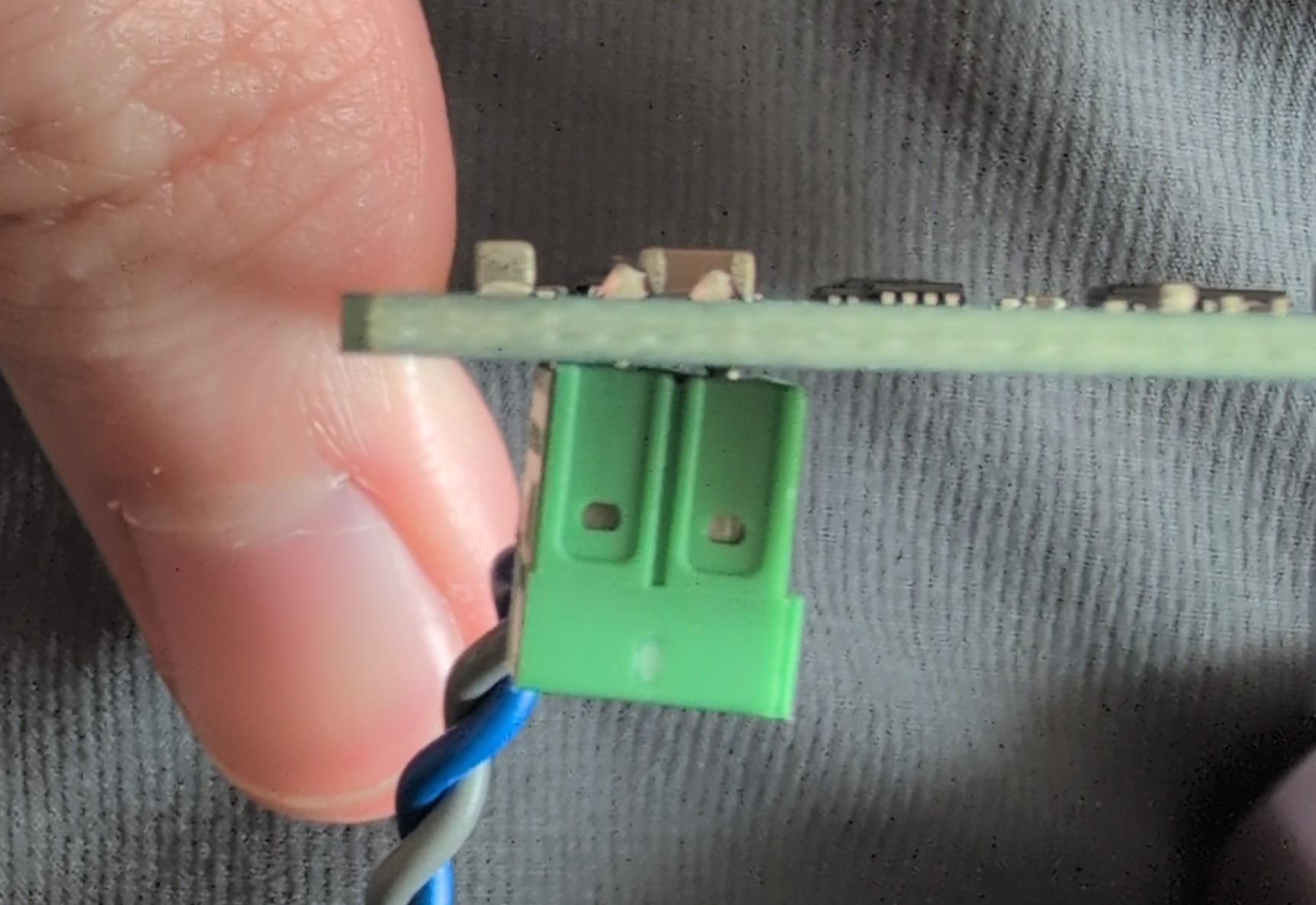
Hello, I just received my 4D and am excited to get it assembled. I am struggling through with attaching the shake hat to the raspberry pi 4b board. It seems like the connection for the geophone on the shake hat is coming into contact with 2 of the POE pins on the 4b board as I try to insert it down on the the GPIO pins.
Is this supposed to make contact like this? Looking at the geophone connection, its actually slightly raised above the board and slanted to the side. I’m not sure if this is a terrible soldering job or correct? Maybe if it wasn’t slanted it would go on? Or am I doing it completely wrong?
Hello vt_hokie, and welcome to our community!
I’ve passed your question to our hardware team, which will advise on the best course of action.
In the meantime, and thanking you for the information and picture already provided, could you take some more photos showing where the Shake board connector is hitting the GPIO pins?
Thank you again.
No, I can’t really take a photo of the strike because its between the boards, and hidden behind the GPIO pins on one side and the ethernet jack on the other. I got it to work - I just forced it on. I imagine there is quite a bit of strain so probably not a good situation. Hopefully the solder joints don’t fail (either the geophone port breaks off or the POE pins).
Ultimately, where you guys place this attachment on the hat, and where the POE pins are at on the 4b is very close. So close that you cannot afford for your manufacturer to do a bad job of soldering this on.
Thank you for the follow-up, and we apologise that your assembly experience was more difficult than it should have been.
To address your concern about the forced fit: if the hat is now seated fully and evenly on the GPIO pins, the setup should function correctly.
Regarding the tight clearance with the Raspberry Pi 4B: this is a known issue specific to that board, caused by the PoE header pins sitting very close to where the Shake Hat needs to seat. The solution we use in our own 4B builds is to clip those pins before fitting the hat. We recognise this is an extra step that shouldn’t fall on the customer, and we will make sure this is called out clearly in our documentation going forward, so others aren’t caught off guard.
If you’d like to reseat the hat properly in the way we do it, here is the procedure:
- Power everything down and unplug completely
- Carefully unseat the Shake Hat using proper ESD precautions
- Use flush-cut pliers to clip the PoE header pins on the Pi 4B
- Reseat the Shake Hat as it should now fit without contact or strain
- Power the instrument back up and verify normal operation
On the geophone connector appearing slightly raised or angled: our hardware team has confirmed this is within manufacturing tolerance and will not affect performance or reliability. We have nonetheless flagged your feedback to our manufacturer as a quality benchmark for future production runs.
We genuinely appreciate you taking the time to document this, as it helps us improve.
Please don’t hesitate to reach out if anything else comes up.