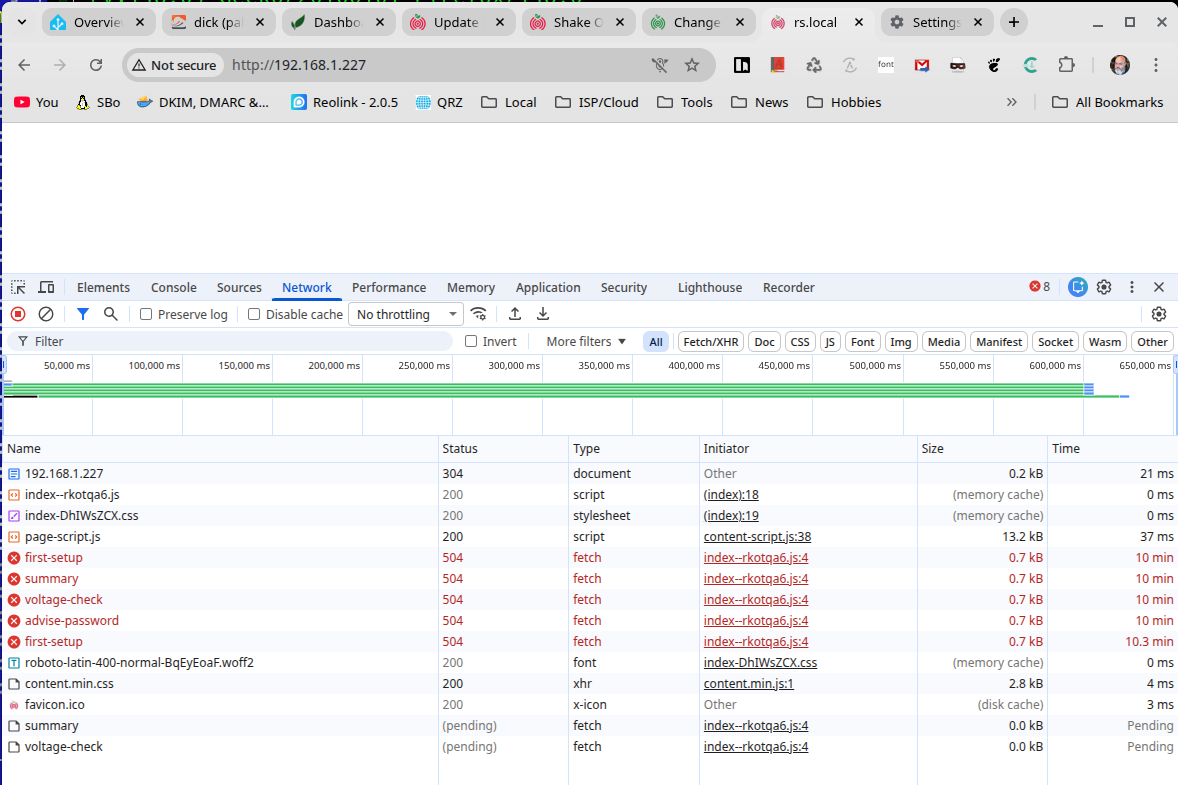
Following a house-move I decided to reinstate my very early RS1D in a new location. After physically attaching it to the LAN in new location I returned to my study to re-configure it with updated location. I was unable to see anything in my browser - completely blank. Supposing all sorts of possible issues arising from a couple of years in storage I decided best was to rebuild the SD Card and start “from scratch”. Having reyurned the hardware to my desk that build process completed apparently successfully after a while. I can connect using SSH, but still no web interface at all. I can see that nothing has port 80 open (no nginx or apache, hence no web page). I can also see that it tries to upgrade itself post boot, although that’s unsuccessful.
Below find output from the terminal: the log as it updates, where it seems that there’s a dependency on psutil not met with error/failure messgae before the process completes. There’s a netstat showing that port 80 hasn’t been openend, a ping shoing outbound net traffic works, and a couple of systemctl commands to show the process status. Oh, and a docker ps showing three containers running.
Is this a known issue, remediation on progress, or is this likely new? If in progress then that’s fine, a vague idea of when to re-try would be helpful. If not then would any oter details help?
I have another RPI, but it’s newer (bu not a lot!) but it has different mounting hole locations so might need to modify the case if that has to be the solution!
Here’s the script…
2026 093 20:20:25: Updating Docker image registry.gitlab.com/rshake-public/rsh-data-consumer
2026 093 20:20:28: Software updates complete.

2026 093 20:42:17: Checking for software updates...
2026 093 20:42:17: Updating rsh-SW-updater
2026 093 20:42:21:      Shake-OS is up to date (ver 0.20)
2026 093 20:42:22: Installing ver 0.21.2 of the R-Shake system...
2026 093 20:42:22: Current patch level for ver 0.21 is 0
2026 093 20:42:30: Installing FE Config:v21, please wait...
Pulling new Docker Image from Registry, please wait...v21.2: Pulling from rshake-public/rsh-fe-config
Digest: sha256:86a93a2bcace189c8f0eb2980ec32aeecc4a4b7d14d07c426e266ca093953229
Status: Image is up to date for registry.gitlab.com/rshake-public/rsh-fe-config:v21.2
Installing Python requirements, please wait...
DEPRECATION: Python 2.7 reached the end of its life on January 1st, 2020. Please upgrade your Python as Python 2.7 is no longer maintained. pip 21.0 will drop support for Python 2.7 in January 2021. More details about Python 2 support in pip can be found at https://pip.pypa.io/en/latest/development/release-process/#python-2-support pip 21.0 will remove support for this functionality.
Looking in links: /usr/local/src/UPG/UPG.21/files/FE2-installer/files//pip-wheels
Requirement already satisfied: Flask==0.11.1 in /usr/local/lib/python2.7/dist-packages (from -r requirements.txt (line 1)) (0.11.1)
Requirement already satisfied: Flask-Testing==0.6.1 in /usr/local/lib/python2.7/dist-packages (from -r requirements.txt (line 2)) (0.6.1)
Requirement already satisfied: Flask-Session==0.3.1 in /usr/local/lib/python2.7/dist-packages (from -r requirements.txt (line 3)) (0.3.1)
Requirement already satisfied: pamela==1.0.0 in /usr/local/lib/python2.7/dist-packages (from -r requirements.txt (line 4)) (1.0.0)
Requirement already satisfied: jinja2==2.9.5 in /usr/local/lib/python2.7/dist-packages (from -r requirements.txt (line 5)) (2.9.5)
Requirement already satisfied: itsdangerous==0.24 in /usr/local/lib/python2.7/dist-packages (from -r requirements.txt (line 6)) (0.24)
Requirement already satisfied: werkzeug==0.11.15 in /usr/local/lib/python2.7/dist-packages (from -r requirements.txt (line 7)) (0.11.15)
ERROR: Could not find a version that satisfies the requirement psutil==5.9.2 (from -r requirements.txt (line 8)) (from versions: none)
ERROR: No matching distribution found for psutil==5.9.2 (from -r requirements.txt (line 8))
2026 093 20:43:02: FE Config:v21 installation failed, not installing
2026 093 20:43:02: ERROR: version installation failed, quitting without doing anything, goodbye ...
2026 093 20:43:02: Upgrade to version 21 failed, not continuing
2026 093 20:43:02: Installing ver 0.21.2 of the R-Shake system...
2026 093 20:43:02: Current patch level for ver 0.21 is 0
2026 093 20:43:04: Installing FE Config:v21, please wait...
Pulling new Docker Image from Registry, please wait...v21.2: Pulling from rshake-public/rsh-fe-config
Digest: sha256:86a93a2bcace189c8f0eb2980ec32aeecc4a4b7d14d07c426e266ca093953229
Status: Image is up to date for registry.gitlab.com/rshake-public/rsh-fe-config:v21.2
Installing Python requirements, please wait...
DEPRECATION: Python 2.7 reached the end of its life on January 1st, 2020. Please upgrade your Python as Python 2.7 is no longer maintained. pip 21.0 will drop support for Python 2.7 in January 2021. More details about Python 2 support in pip can be found at https://pip.pypa.io/en/latest/development/release-process/#python-2-support pip 21.0 will remove support for this functionality.
Looking in links: /usr/local/src/UPG/UPG.21/files/FE2-installer/files//pip-wheels
Requirement already satisfied: Flask==0.11.1 in /usr/local/lib/python2.7/dist-packages (from -r requirements.txt (line 1)) (0.11.1)
Requirement already satisfied: Flask-Testing==0.6.1 in /usr/local/lib/python2.7/dist-packages (from -r requirements.txt (line 2)) (0.6.1)
Requirement already satisfied: Flask-Session==0.3.1 in /usr/local/lib/python2.7/dist-packages (from -r requirements.txt (line 3)) (0.3.1)
Requirement already satisfied: pamela==1.0.0 in /usr/local/lib/python2.7/dist-packages (from -r requirements.txt (line 4)) (1.0.0)
Requirement already satisfied: jinja2==2.9.5 in /usr/local/lib/python2.7/dist-packages (from -r requirements.txt (line 5)) (2.9.5)
Requirement already satisfied: itsdangerous==0.24 in /usr/local/lib/python2.7/dist-packages (from -r requirements.txt (line 6)) (0.24)
Requirement already satisfied: werkzeug==0.11.15 in /usr/local/lib/python2.7/dist-packages (from -r requirements.txt (line 7)) (0.11.15)
ERROR: Could not find a version that satisfies the requirement psutil==5.9.2 (from -r requirements.txt (line 8)) (from versions: none)
ERROR: No matching distribution found for psutil==5.9.2 (from -r requirements.txt (line 8))
2026 093 20:43:32: FE Config:v21 installation failed, not installing
2026 093 20:43:33: ERROR: version installation failed, quitting without doing anything, goodbye ...
2026 093 20:43:33: ERROR: patch installation failed, quitting without doing anything, goodbye ...
2026 093 20:43:33: Upgrade to version 22 failed, not continuing
2026 093 20:43:33: Updating Docker image registry.gitlab.com/rshake-public/rsh-fe-config:v21.2
2026 093 20:43:35: Updating Docker image registry.gitlab.com/rshake-public/rsh-data-producer
2026 093 20:43:38: Updating Docker image registry.gitlab.com/rshake-public/rsh-data-consumer
2026 093 20:43:41: Software updates complete.

^C
myshake@raspberryshake:/opt/log $ netstat -lntup | grep LIST
(Not all processes could be identified, non-owned process info
 will not be shown, you would have to be root to see it all.)
tcp        0      0 0.0.0.0:22              0.0.0.0:*               LISTEN      -
tcp        0      0 127.0.0.1:2947          0.0.0.0:*               LISTEN      -
tcp        0      0 0.0.0.0:111             0.0.0.0:*               LISTEN      -
tcp6       0      0 :::18006                :::*                    LISTEN      -
tcp6       0      0 :::16032                :::*                    LISTEN      -
tcp6       0      0 :::18000                :::*                    LISTEN      -
tcp6       0      0 :::18002                :::*                    LISTEN      -

myshake@raspberryshake:/opt/log $ ping auth.raspberryshake.org
PING auth.raspberryshake.org (104.21.12.216) 56(84) bytes of data.
64 bytes from 104.21.12.216 (104.21.12.216): icmp_seq=1 ttl=59 time=19.9 ms
64 bytes from 104.21.12.216 (104.21.12.216): icmp_seq=2 ttl=59 time=30.5 ms
64 bytes from 104.21.12.216 (104.21.12.216): icmp_seq=3 ttl=59 time=19.8 ms
^C
--- auth.raspberryshake.org ping statistics ---
3 packets transmitted, 3 received, 0% packet loss, time 3ms
rtt min/avg/max/mdev = 19.784/23.398/30.492/5.016 ms

myshake@raspberryshake:/opt/log $ sudo systemctl restart rsh-fe-config

myshake@raspberryshake:/opt/log $ sudo systemctl status rsh-fe-config
● rsh-fe-config.service - FE Config Service
   Loaded: loaded (/lib/systemd/system/rsh-fe-config.service; disabled; vendor preset: enabled)
   Active: active (exited) since Fri 2026-04-03 20:48:18 UTC; 9s ago
  Process: 4339 ExecStart=/usr/local/bin/./rsh-fe-config START (code=exited, status=0/SUCCESS)
 Main PID: 4339 (code=exited, status=0/SUCCESS)
   CGroup: /system.slice/rsh-fe-config.service
           ├─4579 sudo python /usr/local/src/FE-CChan/app.py -i 172.17.0.2 -p 8000
           └─4600 python /usr/local/src/FE-CChan/app.py -i 172.17.0.2 -p 8000

Apr 03 20:48:00 raspberryshake systemd[1]: Starting FE Config Service...
Apr 03 20:48:02 raspberryshake rsh-fe-config[4339]: 45e1f251fedd9f1ae00b05d02c527f2012517185e6791a6d9e419f38bae7a204
Apr 03 20:48:18 raspberryshake systemd[1]: Started FE Config Service.
Apr 03 20:48:19 raspberryshake sudo[4579]:  myshake : TTY=unknown ; PWD=/ ; USER=root ; COMMAND=/usr/bin/python /usr/local/src/FE-CC
Apr 03 20:48:19 raspberryshake sudo[4579]: pam_unix(sudo:session): session opened for user root by (uid=0)

myshake@raspberryshake:/opt/log $ docker ps
CONTAINER ID        IMAGE                                                   COMMAND                  CREATED              STATUS              PORTS                                                                          NAMES
45e1f251fedd        registry.gitlab.com/rshake-public/rsh-fe-config:v21.2   "/bin/sh start.sh"       About a minute ago   Up 46 seconds       0.0.0.0:21->21/tcp, 0.0.0.0:80->80/tcp, 0.0.0.0:10090-10100->10090-10100/tcp   rfe
56c69284fa93        registry.gitlab.com/rshake-public/rsh-data-consumer     "/usr/bin/entry.sh /b"   4 minutes ago        Up 4 minutes        0.0.0.0:16032->16032/tcp                                                       dataC
6ab07a3c3e30        registry.gitlab.com/rshake-public/rsh-data-producer     "/usr/bin/entry.sh /b"   5 minutes ago        Up 5 minutes        0.0.0.0:18000->18000/tcp, 0.0.0.0:18002->18002/tcp, 0.0.0.0:18006->18006/tcp   dataP
myshake@raspberryshake:/opt/log $ docker ps
CONTAINER ID        IMAGE                                                   COMMAND                  CREATED              STATUS              PORTS                                                                          NAMES
45e1f251fedd        registry.gitlab.com/rshake-public/rsh-fe-config:v21.2   "/bin/sh start.sh"       About a minute ago   Up About a minute   0.0.0.0:21->21/tcp, 0.0.0.0:80->80/tcp, 0.0.0.0:10090-10100->10090-10100/tcp   rfe
56c69284fa93        registry.gitlab.com/rshake-public/rsh-data-consumer     "/usr/bin/entry.sh /b"   5 minutes ago        Up 5 minutes        0.0.0.0:16032->16032/tcp                                                       dataC
6ab07a3c3e30        registry.gitlab.com/rshake-public/rsh-data-producer     "/usr/bin/entry.sh /b"   5 minutes ago        Up 5 minutes        0.0.0.0:18000->18000/tcp, 0.0.0.0:18002->18002/tcp, 0.0.0.0:18006->18006/tcp   dataP

myshake@raspberryshake:/opt/log $ tail -f upgrade.log
ERROR: No matching distribution found for psutil==5.9.2 (from -r requirements.txt (line 8))
2026 093 20:43:32: FE Config:v21 installation failed, not installing
2026 093 20:43:33: ERROR: version installation failed, quitting without doing anything, goodbye ...
2026 093 20:43:33: ERROR: patch installation failed, quitting without doing anything, goodbye ...
2026 093 20:43:33: Upgrade to version 22 failed, not continuing
2026 093 20:43:33: Updating Docker image registry.gitlab.com/rshake-public/rsh-fe-config:v21.2
2026 093 20:43:35: Updating Docker image registry.gitlab.com/rshake-public/rsh-data-producer
2026 093 20:43:38: Updating Docker image registry.gitlab.com/rshake-public/rsh-data-consumer
2026 093 20:43:41: Software updates complete.


myshake@raspberryshake:/opt/log $ docker ps
CONTAINER ID        IMAGE                                                   COMMAND                  CREATED             STATUS              PORTS                                                                          NAMES
45e1f251fedd        registry.gitlab.com/rshake-public/rsh-fe-config:v21.2   "/bin/sh start.sh"       11 minutes ago      Up 10 minutes       0.0.0.0:21->21/tcp, 0.0.0.0:80->80/tcp, 0.0.0.0:10090-10100->10090-10100/tcp   rfe
56c69284fa93        registry.gitlab.com/rshake-public/rsh-data-consumer     "/usr/bin/entry.sh /b"   15 minutes ago      Up 14 minutes       0.0.0.0:16032->16032/tcp                                                       dataC
6ab07a3c3e30        registry.gitlab.com/rshake-public/rsh-data-producer     "/usr/bin/entry.sh /b"   15 minutes ago      Up 15 minutes       0.0.0.0:18000->18000/tcp, 0.0.0.0:18002->18002/tcp, 0.0.0.0:18006->18006/tcp   dataP
myshake@raspberryshake:/opt/log $